Showing posts with label associate. Show all posts

Thursday, October 15, 2009

5. Making Money Blogging - Real Money

Putting advertisements on your site just aren't enough to make a real income, so you become an affiliate and help sell another companies products for a small percentage of the sales.

This is just as easy as putting ads on your site, it is just more profitable. One of the secrets of selling affiliate products is providing content. They just don't have a list of items to sell, they give you other reasons to come to site. A good example of content is TV and movies at http://simplyvampires.blogspot.com/2009/10/blade-trinity.html. It provides information about the movie, a place to see the movie, along with books, posters, dvds, and scripts to purchase.

There are only two places that I really suggest that you start off with:

Amazon.com. Amazon has about every product imaginable and they are a trusted source.

Linkshare.com. It has an amazing amount of affiliates that you can work with and you keep all your earning in one basic place. I use iTunes, BestBuy, and several other affiliate services on Linkshare. It is great to have everything in one place.
There are a lot of affiliates out there that you can work with, but I found myself forgetting all the ones that I had, so I have just have these two now. If you look at my sites, you would think that I have more, but that is the secret of Linkshare.

LinkShare_120x240v1

These are the five basic steps you need to get you website up and running. I will continue giving you tips in other posts, so check back for more.

Search Engine Optimization is a great way to get your site out there, so try out this book.


1. Making Money Blogging - Setting up a Blog Account

The first thing you need to do is create your first blog. Don't worry about your topic right now. You will figure that out as you create more blogs.
I would suggest using www.blogger.com. Blogger.com is a very simple tool. A lot of people use WordPress, which I only recommend if you are technically savvy, and even if you are tech savvy, it's not an intuitive tool.
After you create one blog, you can create more blogs as new ideas occur to you, using the blogger dashboard.

To set up a new Blogger account, complete the following steps:

1. Open IE (internet explorer) or Firefox.

2. Press Enter. Don't worry, the address automatically changes after you press enter, but you are in the right place. The create a blog page displays


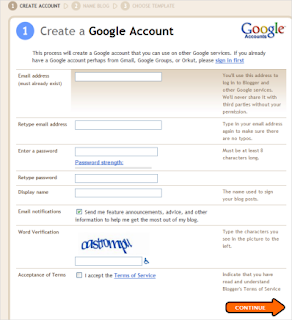
3. Click the Create a Blog button. The Create a Google Account page displays:

Note: Don't let the instructions fool you, you can use any email address that you want.

4. Fill out the form, and if you are like me, you will take you at least 3 or 4 times to type the correct Word Verification.
Make sure you read the Terms of Service, and click the checkbox to accept them.

5. Click Continue. The Name your blog screen displays:


6. Type the name of your new blog in the Blog title field. You can change this title later.

7. Now, figure out what your Blog addresss (URL). This is the address you will give your users, so that they can access your new blog. You can't change this later, but you will be able to add a new blog with a new address to this account. If the URL isn't available, the system will provide suggestions. Or, just keep entering ones that you like until you hit one that works.

Note:
You can't change the URL later, but you can add a new blog with a new URL to the account you just set up.

8. Click Continue. The following Choose a template screen displays:


9. Scroll through the list of templates, and click the round radio box to select a template. If you want to change the template later, there is a bigger selection of templates in your layout section..

10. Click Continue. The Your blog has been created! screen displays.

11. Click Continue again to start your first blog.

You have completed the first and often the hardest step - Setting up your Blogger Account.

See Writing Your First Post.