Take Sales and Customer Service calls for solid well-known companies. The criteria is high and you must have at least a 500 FICA score because you do work for high quality companies and you deal with confidential information on a regular basis, so they need to make sure that you aren't in a risk group.
I was just reading an article where a woman got a job taking Eddie Bauer Customer Service calls. Sounds great doesn't it, so if you have good credit and great customer service skills, get started today at VIP Brand Ambassador.
Showing posts with label unemployed. Show all posts
Showing posts with label unemployed. Show all posts
Saturday, October 17, 2009

Thursday, October 15, 2009
Telecommuting - Liveops
There are a lot of jobs out there where you can work from home, but here is one of my favorites.
http://www.liveops.com
You not only take calls for infomercials, you get other opportunities when you've proved yourself. This isn't an easy job, since you're competing with other people taking calls, but with some hard work, you can easily get in the 2000.00 and 3000.00 dollar a month clubs.
First, you must have a home phone and a reliable internet service.
You have to jump through a couple of hoops to get hired, but it is worth it. Fill out the online application, a basic computer test, and the phone audition. I personally don't know anyone who didn't pass the audition, even people with accents. After you get approved, you will need to complete your background information and send in the background check fee. I know it seems odd for them to charge you the fee, but they get so many people applying who aren't serious and they are out the background check fee. It is a minimal fee, so no worries. And, remember, if you get the job, you will be handling customer's confidential information all day long, including credit card information, so a background check is necessary.
After you pass the background check, you will need to fill out standard paperwork,such as where you want your paycheck deposited. You will get paid on the 1st and the 16th of every month.
You will work as an independent contractor through Liveops, so your home office is a tax right off. After all of your paperwork is done and the company confirms your phone number and internet, you need to go to the next step, which is certification. You only have 30 days to complete the certification, so do don't let your nervousness about taking calls delay you.
You don't get paid to do the certifications, but they don't take long to do. The certifications teach you the laws you need to know for your new job, how to get your computer set up along with how to take calls, and knowledge about the first calls you will be taking.
Next, you take 30 calls to complete the certification. Finally you are getting paid. The calls come in slow, since you are a newbie and need time to adjust. After 30 calls, you are now a full-fledged independent contractor with Liveops and you have many more money making opportunities coming your way.
This is a fun job and you meet great people sitting in your home office. Who knows maybe I will see you in the Liveops chatroom one of these days.
http://www.liveops.com
You not only take calls for infomercials, you get other opportunities when you've proved yourself. This isn't an easy job, since you're competing with other people taking calls, but with some hard work, you can easily get in the 2000.00 and 3000.00 dollar a month clubs.
First, you must have a home phone and a reliable internet service.
You have to jump through a couple of hoops to get hired, but it is worth it. Fill out the online application, a basic computer test, and the phone audition. I personally don't know anyone who didn't pass the audition, even people with accents. After you get approved, you will need to complete your background information and send in the background check fee. I know it seems odd for them to charge you the fee, but they get so many people applying who aren't serious and they are out the background check fee. It is a minimal fee, so no worries. And, remember, if you get the job, you will be handling customer's confidential information all day long, including credit card information, so a background check is necessary.
After you pass the background check, you will need to fill out standard paperwork,such as where you want your paycheck deposited. You will get paid on the 1st and the 16th of every month.
You will work as an independent contractor through Liveops, so your home office is a tax right off. After all of your paperwork is done and the company confirms your phone number and internet, you need to go to the next step, which is certification. You only have 30 days to complete the certification, so do don't let your nervousness about taking calls delay you.
You don't get paid to do the certifications, but they don't take long to do. The certifications teach you the laws you need to know for your new job, how to get your computer set up along with how to take calls, and knowledge about the first calls you will be taking.
Next, you take 30 calls to complete the certification. Finally you are getting paid. The calls come in slow, since you are a newbie and need time to adjust. After 30 calls, you are now a full-fledged independent contractor with Liveops and you have many more money making opportunities coming your way.
This is a fun job and you meet great people sitting in your home office. Who knows maybe I will see you in the Liveops chatroom one of these days.
5. Making Money Blogging - Real Money
Putting advertisements on your site just aren't enough to make a real income, so you become an affiliate and help sell another companies products for a small percentage of the sales.
This is just as easy as putting ads on your site, it is just more profitable. One of the secrets of selling affiliate products is providing content. They just don't have a list of items to sell, they give you other reasons to come to site. A good example of content is TV and movies at http://simplyvampires.blogspot.com/2009/10/blade-trinity.html. It provides information about the movie, a place to see the movie, along with books, posters, dvds, and scripts to purchase.
There are only two places that I really suggest that you start off with:
Amazon.com. Amazon has about every product imaginable and they are a trusted source.
Linkshare.com. It has an amazing amount of affiliates that you can work with and you keep all your earning in one basic place. I use iTunes, BestBuy, and several other affiliate services on Linkshare. It is great to have everything in one place.
There are a lot of affiliates out there that you can work with, but I found myself forgetting all the ones that I had, so I have just have these two now. If you look at my sites, you would think that I have more, but that is the secret of Linkshare.

These are the five basic steps you need to get you website up and running. I will continue giving you tips in other posts, so check back for more.
Search Engine Optimization is a great way to get your site out there, so try out this book.
This is just as easy as putting ads on your site, it is just more profitable. One of the secrets of selling affiliate products is providing content. They just don't have a list of items to sell, they give you other reasons to come to site. A good example of content is TV and movies at http://simplyvampires.blogspot.com/2009/10/blade-trinity.html. It provides information about the movie, a place to see the movie, along with books, posters, dvds, and scripts to purchase.
There are only two places that I really suggest that you start off with:
Amazon.com. Amazon has about every product imaginable and they are a trusted source.
Linkshare.com. It has an amazing amount of affiliates that you can work with and you keep all your earning in one basic place. I use iTunes, BestBuy, and several other affiliate services on Linkshare. It is great to have everything in one place.
There are a lot of affiliates out there that you can work with, but I found myself forgetting all the ones that I had, so I have just have these two now. If you look at my sites, you would think that I have more, but that is the secret of Linkshare.
These are the five basic steps you need to get you website up and running. I will continue giving you tips in other posts, so check back for more.
Search Engine Optimization is a great way to get your site out there, so try out this book.
4. Making Money Blogging - Earning Revenue with Advertising
Like I previously mentioned, Google is a huge company and isn't necessarily for the little. Even though some people do have success on it. I would suggest three advertisers at this point:
Adbrite - I love Adbrite. They work just like Google, and people rarely get disabled and if you do get disabled, say you are sorry, and fix the issue to get re-instated. The only time I have ever heard of anyone getting disabled on Adbrite is when the publisher accidently put an ad for one site on another site. You must make sure that when you create an ad zone that you place it where you said you would. Very simple.
Adbrite has Spottt.com, it is a link exchange program for sites that can't afford to pay for advertising. Adbrite supports the small business website owner, and that is why I will stick with them. You just create a little 250x250 pixel ad. It shouldn't be anything fancy.
I created mine using a free software application from Open Office called Draw. It has all the tools I need as a website creator, without the cost and expense of an Adobe Product. Don't get me wrong, I think Photoshop and Illustrator are amazing tools, but I only need a simple drawing program that has more tools than paint.
Bidvertiser - I don't use this one, but most people I talk to prefer this one over Adbrite.
Kontera - I like Kontera and they did well for me until I found adbrite. They do inline advertisements, which I think is great. They are great because they don't put an ad on every line of text, so your reader isn't overwhelmed by all those underlines in the content.
So, these are the advertisers that I would recommend to you as a beginner blogger. In fact, I know publishers that have been using them and have been blogging for years.
If you really want to go with someone like Google, I won't hold it against you, but don't be surprised if the worst happens.
If you want to go with a big name, use Yahoo Publisher. Yahoo Ads is still in the beta stage, but I think that yahoo will probably treat you with more respect than the other big ones.
For more information about Google issues:
Disabling the Politically Incorrect
Disabled with no Clicks
Has Google Adsense Ripped you Off
Another Google Account Disabled
2. Making Money Blogging - Writing Your First Post
1. If you aren't already in the add a post page, click the Posting tab.
If you are just logging in, click New Post on the dashboard.
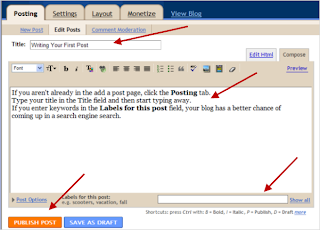
2. Type your title in the Title field and then start typing your blog.
3. If you enter keywords in the Labels for this post field, your blog has a better chance of coming up in a search engine search.
4. Don't forget to run the spellcheck. It is on the Compose tab toolbar.
I encourage you to take advantage of the blogger help. It is very detailed and can answer most of your questions.
1. Making Money Blogging - Setting up a Blog Account
The first thing you need to do is create your first blog. Don't worry about your topic right now. You will figure that out as you create more blogs.
I would suggest using www.blogger.com. Blogger.com is a very simple tool. A lot of people use WordPress, which I only recommend if you are technically savvy, and even if you are tech savvy, it's not an intuitive tool.
After you create one blog, you can create more blogs as new ideas occur to you, using the blogger dashboard.
To set up a new Blogger account, complete the following steps:
1. Open IE (internet explorer) or Firefox. 2. Press Enter. Don't worry, the address automatically changes after you press enter, but you are in the right place. The create a blog page displays
3. Click the Create a Blog button. The Create a Google Account page displays: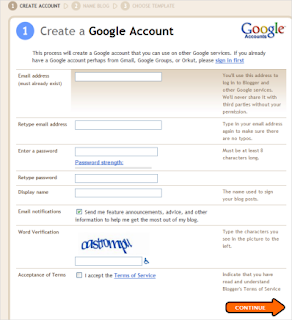
Note: Don't let the instructions fool you, you can use any email address that you want.
4. Fill out the form, and if you are like me, you will take you at least 3 or 4 times to type the correct Word Verification.
Make sure you read the Terms of Service, and click the checkbox to accept them.
5. Click Continue. The Name your blog screen displays:
6. Type the name of your new blog in the Blog title field. You can change this title later.
7. Now, figure out what your Blog addresss (URL). This is the address you will give your users, so that they can access your new blog. You can't change this later, but you will be able to add a new blog with a new address to this account. If the URL isn't available, the system will provide suggestions. Or, just keep entering ones that you like until you hit one that works.
Note: You can't change the URL later, but you can add a new blog with a new URL to the account you just set up.
8. Click Continue. The following Choose a template screen displays:
9. Scroll through the list of templates, and click the round radio box to select a template. If you want to change the template later, there is a bigger selection of templates in your layout section..
10. Click Continue. The Your blog has been created! screen displays.
11. Click Continue again to start your first blog.
You have completed the first and often the hardest step - Setting up your Blogger Account.
See Writing Your First Post.
Subscribe to:
Posts (Atom)
